Mobile pixel art and sprite animation, tailored for on-the-go creation
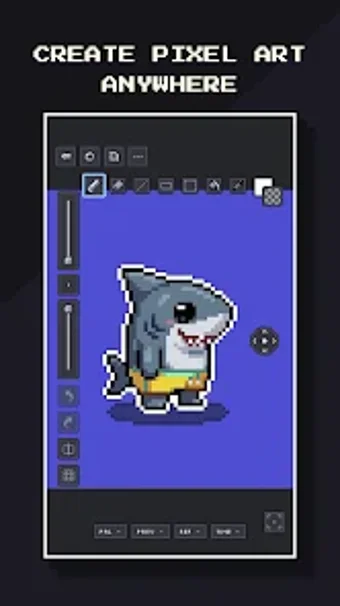
Offers a frame-by-frame animation timeline with onion skinning and layer controls for creating sprites and animated GIFs on a phone or tablet. Pixsama: Pixel Art Editor, from Pixsama, targets pixel artists and 2D game creators who need a mobile workspace. The app supplies movable panels, a radial shortcut menu, palette import/export, and export to PNG, GIF, and sprite sheets, fitting artists who want offline, device-only projects and flexible UI placement.
How Pixsama handles everyday pixel-and-animation tasks
Pixsama gives a complete mobile drawing loop by combining a timeline with onion skinning, per-frame editing, and an eraser, pencil, fill, line, and shape toolkit. The timeline supports up to six frames in the free tier, and exports include PNG, animated GIF, and sprite-sheet output, which lets creators produce deliverables directly from the device without switching tools.
How it integrates with desktop workflows and tools
It supports cross-platform exchange through Aseprite-compatible import/export in the Pro feature set, allowing projects to move between mobile and desktop. The app also saves projects in an .apx editable format and offers palette import/export, which lets artists preserve color consistency when shifting work between environments.
How the interface adapts to touch and stylus use
The UI is adjustable for different inputs: panels are movable and resizable, and a radial shortcut menu can be positioned for thumb or stylus reach. The app explicitly supports stylus input and precise zoom and brush controls, which matters for detailed pixels on small screens and for creators who alternate between finger and pen.
What to expect for privacy, limits, and device support
Projects remain local and offline; Pixsama operates without accounts or cloud dependencies, so files stay on the device. The app runs on Android 10 and newer and is optimized for phones and tablets. Note that the baseline tier limits canvases to 128x128, three layers, and six frames, which constrains more complex sequences unless the project fits within those bounds.
To sum up, a practical mobile studio for focused pixel work
To sum up, Pixsama suits weekend creators, pixel hobbyists, and 2D devs who need an offline mobile editor that keeps projects on-device and moves files to desktop when required. It favors short animations and compact sprites because of the baseline canvas and layer limits. Consider it a capable mobile workspace if your daily routine includes quick sprite edits or on-the-train animation drafts.